Introduction
For the purposes of training our team for the Collegiate Penetration Team Competition (CPTC) for the 2025-2026 season, as team captain, I was facing the challenge of providing an accurate laboratory range environment that the team could potentially face during the competition.
Luckily, my awesome friends ran to my help and all of us together began the planning and building process of out CPTC mock competition range - our goal was to accurately convey a potential modern customer environment with a variation of Windows and Linux servers and other applications.
Planning stage
This year’s theme was to conduct a penetration test on a Cruise Ship! From this hint, we began brainstorming about the services we might typically see on a big operation like a maritime vessel 🚢 :
- Content and media distribution services for in-room and on-board entertainment, such as Jellyfin servers
- Chance game websites, such as an internal application running solitaire, or slot machines
- Various web servers that enable visitors to order room service and put in-room requests,
- Operational Technology (OT) elements such as pressure valves, ship navigation systems…
We then began carving out a timeline for our build:
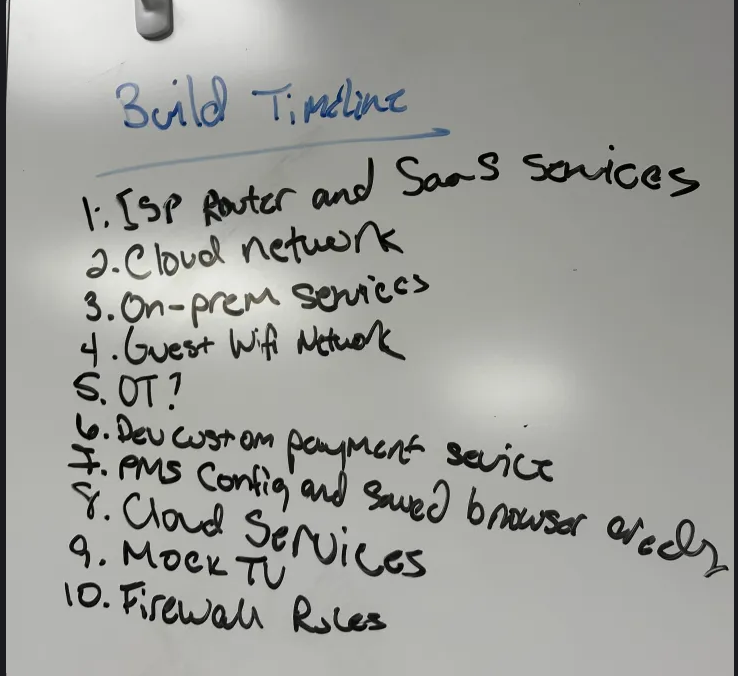
We chose the name EAGLECRUISES as our imaginary company to simulate.
Technical Setup
We host a local lab running a Proxmox hypervisor. It gives us flexibility to create isolated VMs and overlay networks quickly, and to snapshot and revert the environment as needed. From there we layered services to replicate an on-board corporate network with an OT presence and typical IT resources.
Cloud Environment (simulated)
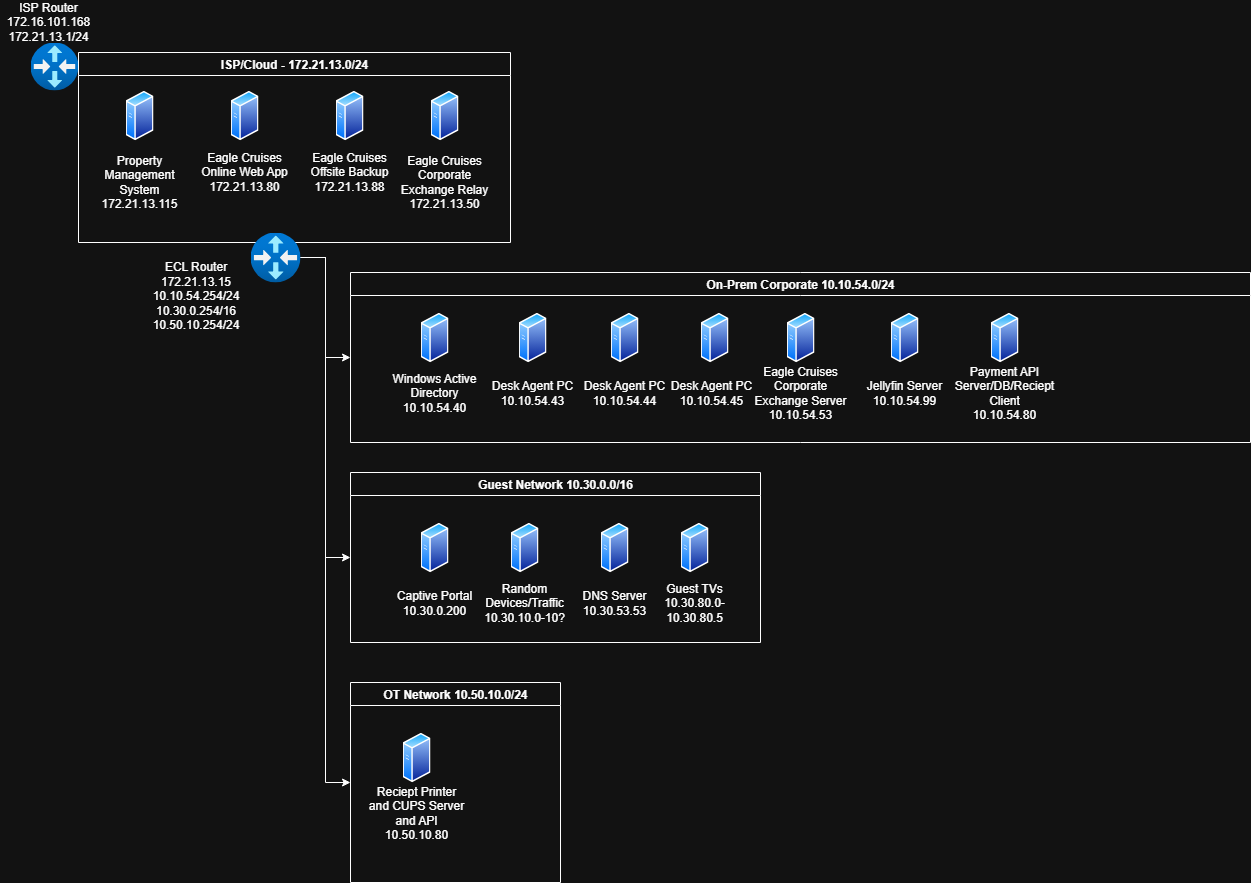
To keep costs low, the “cloud” was a local simulation - a separate subnet that just housed our identity and data services. Within this subnet, we had:
- An OpenLDAP server (Ubuntu 22.04) which also had a MYSQ database storing sample PII. This subnet represented the backbone of authentication and sensitive data for the simulated environment.
- All machines within this subnet had been domain-joined to OpenLDAP domain.
- A payment API server that interacted with the payments associated to in-room service applications.
- An AI chatbot that was vulnerable to a prompt injection attack through improper input sanitization.
- An offsite backup server that stored various backup files, such as OpenLDAP and MYSQL dumps
Guest Network
This subnet’s goal was to simulate any applications a cruise guest could access to in a real-world setting - such as guest room televisions, content servers, room service portals, and captive portals for WiFi access. Our machines included:
- A guest network DNS server,
- A captive portal to simulate a guest supplying login credentials to get wireless access on-board,
- Guest television controls running through web applications
Operational Technology
- A sample PLC/Modbus interface that simulated a lightweight simulated PLC endpoint to represent shipboard automation systems.
- SCADABr server running with its default admin credentials and unencrypted web access.
On-Premises Servers
The purpose of this subnet was to simulate an on-premises corporate environment, with a mix of more legacy technologies (Active Directory) that are still very abundant in the industry, and some more modern applications. These included:
- A vulnerable Jellyfin server with sample movie trailers and pictures loaded up to simulate a content distribution network on-board.
- A domain controller (Windows Server 2019) for our Active Directory domain, with certificate services enabled.
- Plan was to add Elastic/EDR if time allowed.
- A deliberately vulnerable AD segment to simulate common AD attack paths
- UAC bypass scenarios, discoverable credentials in metadata fields, privilege escalation chains.
- Desk agent workstations (Windows 10) that are domain-joined, simulating cruise ship employees.
- Web servers for booking services, room dining and other purchases, chance-based games.
- MS Exchange mail service with an SMTP configuration emulating an open/poorly configured relay to practice detection/mitigation.
After we planned our initial setup on how to allocate machines, our workflow to fully configure this range was roughly to:
- Build base templates and snapshot them before customization.
- Bring up routing on the ECL/edge routers for VNETing
- Deploy services into their intended subnets and join domain where required (e.g., media server, payment client)
- Push certificates to web UIs so browsers behave like in production, and our team can render without problem
No matter how simple it sounded on paper - setting this range up took a little less than two months (I honestly blame MS Exchange for the installation times).
Here is our near-complete network diagram for the lab environment: